📖 4. What is a Quick Event Listing?
A Quick Listing is the fastest, simplest way to put your chess event in front of players on NA Chess Hub. In just a minute or two you can publish your event with only the essentials — name, date, location, a short description, and links to your own registration, flyer, and results pages. No sections, entry fees, or payment setup required.
Why organizers love it
- Free to list. Advertise your event at no cost and reach the growing NA Chess Hub audience.
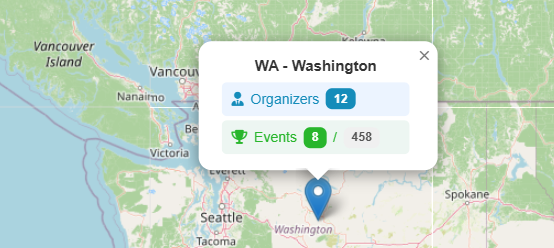
- On the map. Your Quick Listing appears on the North America Chess Map and event calendar right alongside full-service events, so players searching for tournaments in your area can find you.
- Keep your own registration. Already using another site or form to collect entries? No problem — your "Register" button links straight to it.
- Set up in minutes. A streamlined form shows only what you need. No learning curve.
- Grows with you. When you're ready for online registration, payment processing, and pairing/results publishing, you can upgrade to a full-service event anytime — your listing stays put.
What's included
- Event name, type, format, and rating type
- Start and end date with time zone
- Venue address for the Chess Map
- Rich event description
- Info links: Registration, Flyer, Pairing & Results, Live Games, Hotel
- Organizer contact information
What's not included (upgrade for these)
- Online registration on NA Chess Hub
- Entry-fee collection and payment processing
- SwissSys or Free Pair event file generation
- Sections, byes, and pairing/standings publishing
How to create one
- Sign in as a verified organizer.
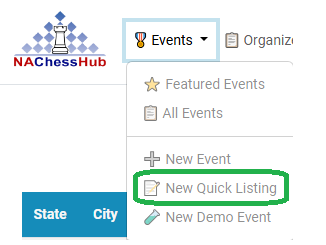
- Open the New Event menu and choose New Quick Listing.
- Fill in the basic event info and your links.
- Save, then set the status to Published to make it visible on the map and calendar.
Want us to handle registration, payments, and pairings for your next event? You can upgrade a Quick Listing to a full-service event at any time.
A Quick Listing is the fastest, simplest way to put your chess event in front of players on NA Chess Hub. In just a minute or two you can publish your event with only the essentials — name, date, location, a short description, and links to your own registration, flyer, and results pages. No sections, entry fees, or payment setup required.
Why organizers love it
- Free to list. Advertise your event at no cost and reach the growing NA Chess Hub audience.
- On the map. Your Quick Listing appears on the North America Chess Map and event calendar right alongside full-service events, so players searching for tournaments in your area can find you.
- Keep your own registration. Already using another site or form to collect entries? No problem — your "Register" button links straight to it.
- Set up in minutes. A streamlined form shows only what you need. No learning curve.
- Grows with you. When you're ready for online registration, payment processing, and pairing/results publishing, you can upgrade to a full-service event anytime — your listing stays put.
What's included
- Event name, type, format, and rating type
- Start and end date with time zone
- Venue address for the Chess Map
- Rich event description
- Info links: Registration, Flyer, Pairing & Results, Live Games, Hotel
- Organizer contact information
What's not included (upgrade for these)
- Online registration on NA Chess Hub
- Entry-fee collection and payment processing
- SwissSys or Free Pair event file generation
- Sections, byes, and pairing/standings publishing
How to create one
- Sign in as a verified organizer.
- Open the New Event menu and choose New Quick Listing.
- Fill in the basic event info and your links.
- Save, then set the status to Published to make it visible on the map and calendar.
Want us to handle registration, payments, and pairings for your next event? You can upgrade a Quick Listing to a full-service event at any time.